

Modern frontends with Cursor AI are easy to frame as a speed story. That would undersell what actually happened here. In this project, the bigger result was a frontend that could carry a complex, highly structured workflow while staying clear, consistent, and usable from one screen to the next.
That outcome did not come from AI acting alone. It came from structure. For most of the project, a single developer handled the entire frontend, using Cursor inside a tightly defined system of rules, patterns, and review. For a short period, a second developer joined, but the core architecture, workflow, and output were shaped by one person directing the process.
What began as AI assistance quickly turned into AI-led implementation. Pages, components, and API integrations were generated largely through guided workflows, while the developer remained responsible for architecture, validation, and quality control. Over the course of the project, more than 30 components and a dozen pages were built this way. The result was not just faster delivery, but a level of consistency and output that exceeded what a conventional solo workflow would normally make possible.
This article looks at what changes when AI becomes part of a disciplined frontend workflow: faster delivery, stronger consistency, and a development process that can scale without losing structure.
Project Context
To understand why this approach worked, the stack matters. The project used a modern, component-oriented frontend architecture that happens to be well-suited for structured AI generation. Its conventions are explicit, its patterns repeat predictably, and its tooling is consistent.
The stack included:
- Framework: React with Vite for build and development
- UI and Styling: Material UI (MUI) with Emotion
- Data Fetching: TanStack React Query with Axios
- Routing: React Router
- Forms and Utilities: React Hook Form, i18n support
These choices were not made arbitrarily. The stack was intentionally selected for scalability and modularity, which made it well-suited for AI-driven development. MUI gave AI a consistent component vocabulary to work from. TanStack Query made data-fetching patterns predictable. React Hook Form reduced ambiguity in form handling. Each choice added a layer of constraint, and constraints are what make AI output reliable.
The application grew incrementally: multiple pages, a reusable component library, API integrations, and full routing, all developed through AI-guided workflows. One developer drove nearly all of it. That context is central to understanding both the scale of the output and the discipline the process required.
AI-Led Development: From Implementation to Guidance
In this project, AI was not a supporting tool. It was the primary builder. Across the frontend, AI generated the majority of the initial implementation, including components, layouts, API integrations, and routing logic. The developer acted as architect, reviewer, and systems designer.
Roughly 90 to 95 percent of the frontend code was AI-generated in its first iteration. The remaining 5 to 10 percent came from human refinement: correcting edge cases, enforcing structural patterns, and resolving situations where the output drifted from the expected standard.
The role this demanded was not simply “developer who uses AI.” It was closer to a tech lead managing a highly capable but guidance-dependent engineer. AI needed clear requirements, structured context, and consistent feedback. Given those inputs, it delivered well. Without them, it drifted.
The most important skill in this workflow was not prompting. It was system design: defining the rules, standards, and structure that gave AI the context it needed to produce reliable output at scale.
Defining the System: Rules, Structure, and Standards
The single most important decision in the project was building a comprehensive rule system before writing any application code. Without this foundation, AI would have produced functional but inconsistent output. Components that worked individually but did not hold together as a system.
Rules were formalized into structured configuration files and organized by domain:
- Project structure: file naming, folder organization, component location
- Component architecture: how components are composed, sized, and separated
- Styling conventions: no inline styles, dedicated styling files per component
- API handling: how data-fetching, loading states, and errors are managed
- Reusability: when to create new components versus referencing existing ones
- Routing, security, performance, and testing standards
The rule system was not static. It evolved throughout the project. When AI violated a pattern, the pattern was documented more precisely and fed back into the rules. Over time this created a tighter feedback loop: better rules produced better output, which revealed new edge cases, which led to better rules. Each correction made the next generation slightly more reliable.
An example rule snippet illustrating component structure conventions:
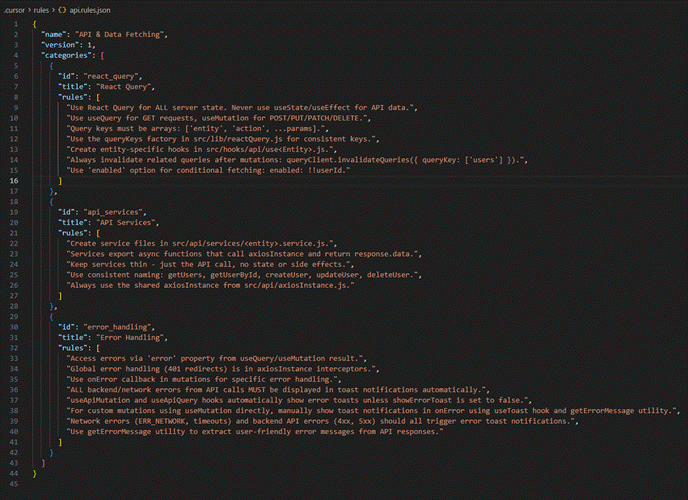
Not every rule was followed perfectly on the first pass, and that is expected. The value of the system was not perfection. It was consistency at scale and a clear standard to enforce during review.
Prompting Strategy: Context Over Complexity
Early in the project, prompts were large and comprehensive. Full feature descriptions, detailed requirements, everything bundled into one block. The outputs were inconsistent. The more context packed into a single prompt, the more AI struggled to prioritize and maintain structure.
The shift that made the biggest difference was moving to small, sequential, context-rich prompts. Each prompt had one clear responsibility. Each task was scoped to a single component, a single API call, or a single UI state. Accuracy improved significantly and validation became far easier.
A well-structured prompt consistently included four elements:
- A clear, single-sentence task definition
- Explicit references to relevant rules covering structure, styling, and reusability
- Supporting context such as Figma screenshots, API response examples, or references to existing components
- Expected behavior for edge cases including empty states, loading, and error handling
Here are examples of prompt structures used throughout the project:
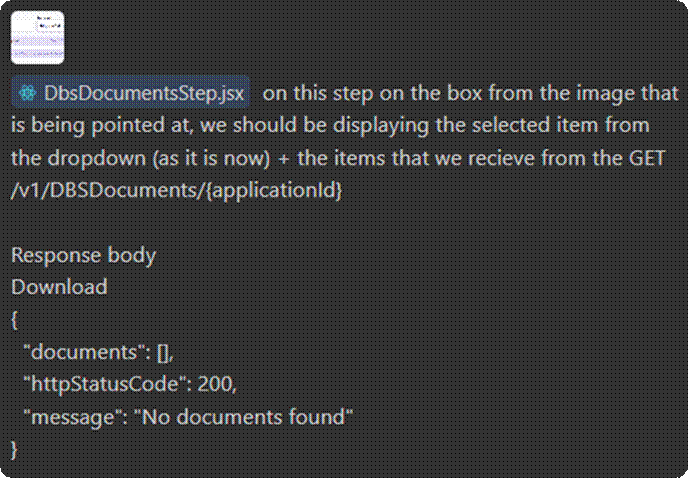
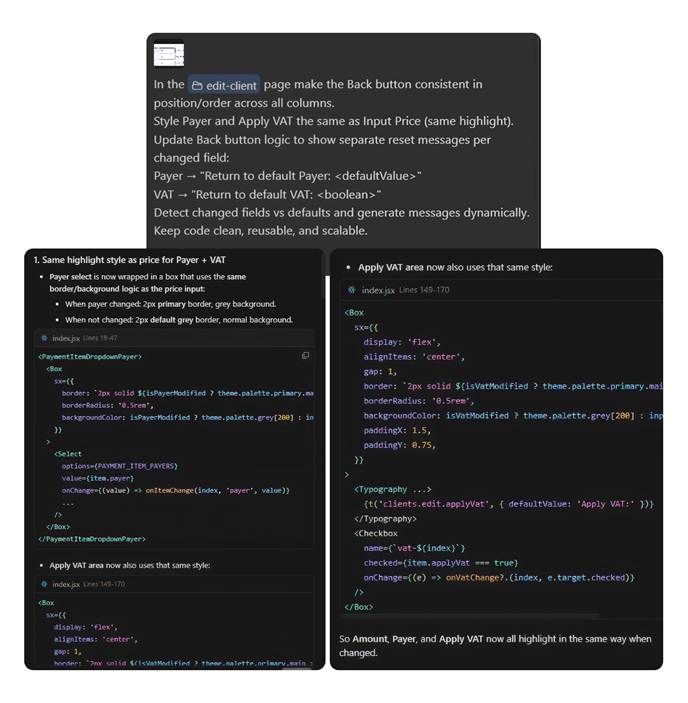
Development was also structured sequentially to prevent AI from generating more than it should at any given stage. The four-phase flow worked like this:
- Build reusable components first. One at a time, with Figma screenshots, Dev Mode snippets, and explicit state variants for hover, disabled, and active. No pages were started until the component library was solid.
- Implement page structure. Using existing components, broken into sections. No new components were created at this stage unless strictly necessary.
- Add feature-specific logic. State management, conditional rendering, user interactions, all scoped tightly to one feature per prompt.
- Integrate APIs. With Swagger definitions, example responses, and explicit field mappings provided upfront. AI was not expected to infer data shapes.
When output did not meet expectations, the response was always to improve the prompt rather than repeat it. Adding missing context, clarifying requirements, or explicitly stating what was wrong led to better results than simple retries. AI was also encouraged to ask clarifying questions when requirements were ambiguous, which consistently improved first-pass quality.
Over time, prompting evolved into something closer to writing a technical brief than typing a search query. The quality of the input directly determined the quality of the output.
Design-Driven Development with Figma
Figma was the single source of truth for all UI implementation. The project used a dedicated design system where every component was predefined with multiple variants, consistent naming, clear hierarchies, and well-specified properties including size, state, and type.
This structure was not just convenient. It was load-bearing. Without a well-organized design system, AI interpretation becomes guesswork. With one, AI had an unambiguous reference for every visual decision it needed to make. Because variants were predefined in the design system, AI could reliably map visual states to implementation without needing additional explanation for each one.
Three practices made this integration particularly effective:
- Isolating components before implementation. Instead of passing full-page designs, individual components were extracted and provided as focused inputs. This reduced noise and kept AI focused on a single responsibility at a time.
- Using auto layout instead of fixed positioning. This made designs inherently responsive and predictable, which translated directly into better-structured generated code.
- Referencing Figma Dev Mode for spacing, font properties, and color values. Not as absolute rules, but as guidance aligned to the project styling conventions.
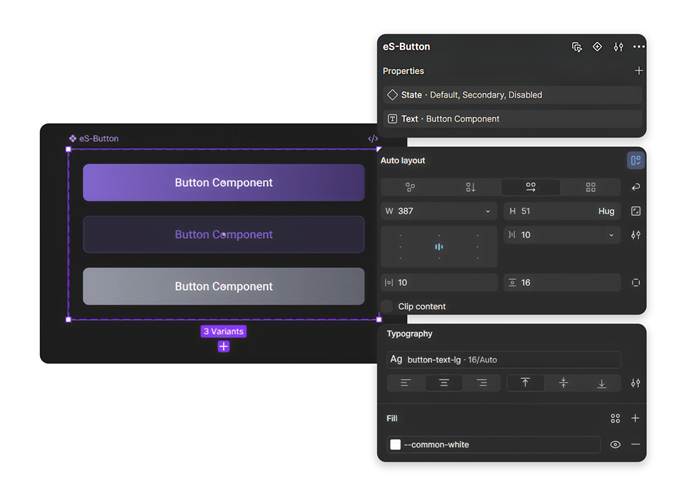
Design tokens covering colors, typography, spacing, and border radius were defined consistently across the design system and mapped into the frontend styling layer. Referencing these tokens in prompts meant AI maintained visual consistency without relying on hardcoded values.
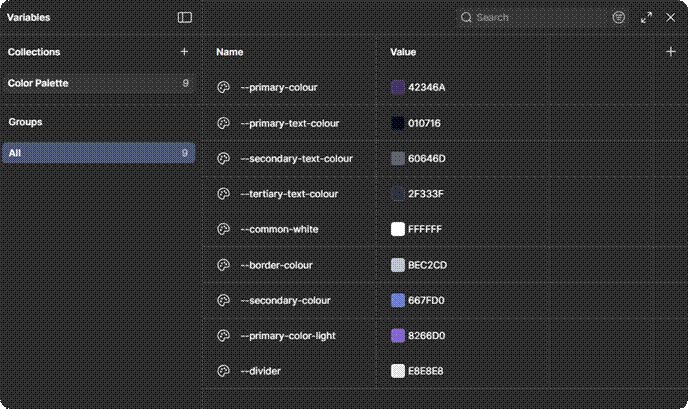
The result was a tight alignment between what was designed and what was built, achieved faster and with fewer correction cycles than a conventional design-to-code handoff process would have allowed.
API Integration with Swagger and Real Data
Left without explicit context, AI tends to invent. It will infer field names, assume nullable handling, and generate data-fetching logic based on pattern-matching rather than actual contracts. Without these references, AI consistently made incorrect assumptions about data structures. In an integration-heavy frontend, this creates a category of bugs that is particularly time-consuming to track down and fix.
The solution was to treat API integration the same way as everything else in the workflow: with structured, explicit context. Swagger definitions provided the contract, but Swagger alone was not enough. Every API integration prompt also included:
- Example request and response payloads
- Screenshots of response structures
- Explicit field-level mappings and naming references
- Notes on optional or nullable fields and how they should be handled in the UI
Grounding prompts in real data rather than schema descriptions alone meant AI could correctly map response data to UI components, handle edge cases from the first generation, and structure API calls in a way that reflected actual backend behavior.
The practical outcome was fewer integration bugs, less time spent on corrections, and a codebase that reflected actual backend contracts rather than plausible approximations of them.
Iteration, Code Review, and Validation
No AI output was accepted without review. AI-generated code was never treated as final output, but as a first draft requiring validation. Every generated implementation was validated before it moved forward, not as a formality, but as the mechanism by which the entire system improved over time.
The validation process covered six consistent areas:
- Structural alignment: does the output conform to defined rules and file conventions?
- Pattern consistency: does it match how equivalent components are implemented elsewhere in the codebase?
- Reusability: did AI create something new that already exists, or reuse correctly?
- Edge case coverage: are loading, error, and empty states properly handled?
- Complexity: is the implementation as simple as it should be, or has AI overengineered it?
- Linting compliance: does it pass the defined code standards?
When issues were found, they were not just fixed. They were documented. Corrections fed back into the rule system, and AI was informed of the pattern it had missed. This created a compounding improvement effect across the project.
One pattern that came up consistently was AI over-engineering logic, particularly around API data transformations. In those cases, continuing to iterate with AI was sometimes less efficient than just implementing the solution directly. Knowing when to step in and override, rather than continuing to refine a prompt, turned out to be one of the more valuable judgments developed over the course of the project.
Code review was not overhead in this workflow. It was the feedback loop that made the system smarter over time. Every correction was an investment in the quality of every future generation.
Challenges and Limitations
Documenting what worked without documenting what did not would make this a marketing piece, not a technical one. The limitations of AI-driven development are real, and acknowledging them honestly is part of what makes the rest of this credible.
Four challenges came up consistently throughout the project:
- Rule inconsistency. Despite clearly defined guidelines, AI would occasionally default to alternative file structures or reintroduce inline styling. This tended to happen when context windows were large or when sessions switched between agents. Tighter rule specificity and shorter, more focused prompts helped significantly.
- Redundancy. AI sometimes created new components instead of reusing existing ones. Active monitoring during review was required to catch this. The rule system helped reduce it but did not eliminate it entirely.
- Over-complexity in logic. Particularly in API data transformation and conditional rendering, AI leaned toward comprehensiveness rather than simplicity. Explicit instructions to prefer the simplest viable solution helped, but this needed consistent reinforcement throughout the project.
- Context retention across sessions. This was the most structurally significant limitation. AI carried no memory between sessions, which meant previously established patterns and decisions occasionally had to be reintroduced. The mitigation was persistent documentation: keeping rules, decisions, and architectural context in files that could be included at the start of new sessions. It added some workflow overhead, but it was manageable and predictable once the habit was established.
None of these were blockers, and each had a defined way to manage it. But they required active attention, and any team considering this approach should plan for them from the start rather than discovering them mid-project. Taken together, these limitations reinforce one clear truth: AI is powerful, but it is not yet autonomous. The human layer is not optional.
Measurable Impact on Productivity
The productivity gains were not marginal. They were structural.
Tasks that would typically take two to three days of conventional development were completed within a single day. UI components that might take three to four hours to build from scratch, including variants, states, and responsive behavior, were generated, reviewed, and refined in under an hour. That ratio held consistently across the project.
The most significant gains appeared in UI development, where AI translated Figma designs into functional, styled components with minimal manual intervention. But the compounding effect across the full project was where the real advantage became clear. One developer, working with a structured AI system, delivered output at a pace that would typically require a small team.
Key outcomes included:
- UI components delivered roughly 3 to 4 times faster than conventional solo development
- Consistent alignment between Figma designs and implemented components throughout the project
- Significantly reduced effort spent on repetitive implementation tasks
- Developer attention shifted toward architecture, validation, and quality, which is where it adds the most value
For a short period, a second developer joined the project. Their presence confirmed that the workflow scaled. With clear rules and structured prompting already established, onboarding into the AI-driven process was quick, and parallel development maintained consistency without adding significant coordination overhead.
Documentation as a Built-In Output
One outcome that tends to get overlooked in AI development discussions is documentation. In this project, it was not an afterthought. It was generated alongside the code, as a natural output of working in a structured way.
As part of the workflow, AI generated a comprehensive README covering project setup, architecture decisions, component conventions, API integration patterns, and development guidelines. This was not a high-level summary. It was a structured onboarding document that reflected the actual state of the codebase.
The practical value became clear when the second developer joined. Instead of spending hours on knowledge transfer, they could read through the generated documentation and start contributing within the same session. Documentation that would normally be deferred under delivery pressure, or skipped entirely, was simply a byproduct of working in a structured way.
In AI-driven development, good documentation is not a separate workstream. It falls out of a well-structured process, if you build the process correctly from the start.
Key Learnings
This project produced a clear set of principles for building a structured AI development workflow. They are listed here not as suggestions but as requirements. These are the practices without which this approach does not work.
Structure first:
- Define rules, conventions, and standards before implementation begins. AI performs to the quality of the system it is given.
- Organize rules by domain and keep them specific. Vague rules produce inconsistent output.
Prompt with discipline:
- One task per prompt. One responsibility per component. Break everything into the smallest viable unit.
- Provide context explicitly through designs, examples, and API contracts. AI cannot reliably infer what it is not shown.
Validate consistently:
- Review every output. Not to catch catastrophic failures, but to catch the drift that accumulates into inconsistency over time.
- Feed corrections back into the rule system. Every fix is an investment in future quality.
Know when to override:
- When AI output requires more iteration than direct implementation would, just implement it directly. The goal is delivery quality, not AI utilization.
Teams that apply these principles consistently will outpace those relying on ad-hoc AI use. The difference shows up in delivery speed, error rates, and the quality of the codebase over time. Three things will define whether that happens: prompting is a skill, not a shortcut. AI outputs reflect input quality. Structure scales AI. Chaos breaks it.
A Shift in What Development Actually Is
The most lasting change from this project was not in velocity or tooling. It was in how development itself was understood.
With structured AI workflows in place, the work that used to consume most of a developer’s time, writing boilerplate, translating designs, wiring up APIs, moved to AI. What remained was the work that actually requires engineering judgment: designing systems, defining constraints, reviewing output, and making architectural decisions that compound over time.
AI did not just speed up what already existed. In several cases it surfaced better patterns, alternative approaches to structure or state management that improved the codebase beyond the original design intent. The developer’s role shifted toward evaluation and decision-making rather than pure execution.
The developers who do well in this environment will not be the ones who write the most code. They will be the ones who define the best systems, guide AI with precision, and hold the quality bar high at every step.
Conclusion
One developer. One structured AI workflow. A full-scale React application delivered faster, more consistently, and at higher quality than conventional development would have allowed.
That is the result. But the result matters less than the system that produced it, because the system is repeatable, scalable, and gets better with every project it runs through. Every cycle produces better rules, sharper prompts, and a more reliable process.
AI is not a productivity hack. When structured correctly, it is a force multiplier for engineering judgment. It compresses the time spent on implementation so that architecture, quality, and intent can occupy the space that syntax used to fill. The teams and developers who understand this early and invest in building the systems to support it will set a delivery standard that will be genuinely difficult to match through conventional means. The competitive advantage in software development is no longer just in writing code. It is in how effectively AI can be guided to write it.