

Case studies go stale fast. Sales teams need proof now, not after a three-week wait. At IWConnect, we solved this with Copilot Studio multi-agent orchestration, a solution where AI agents work with CRM data and ready to use case studies. If your team runs on D365 and SharePoint, this is a blueprint you can adapt.
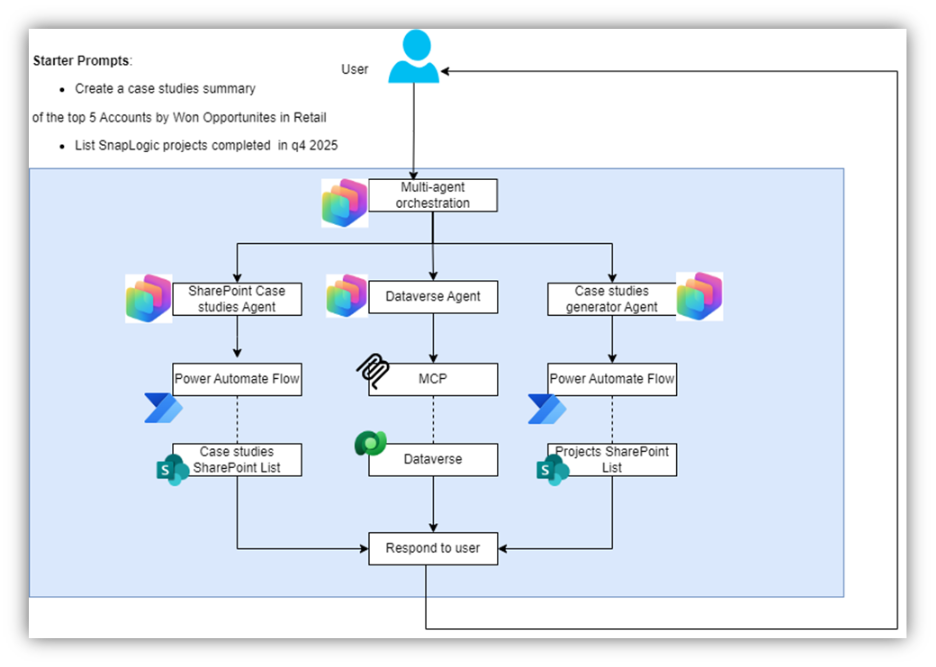
The diagram below shows the full architecture:
What Is Multi-Agent Orchestration in Copilot Studio?
A single Copilot runs several focused agents, each owning one task. You don’t build one big agent that does it all. You split duties. The orchestrator routes requests, agents execute, and results come back combined.
Our orchestrator handles prompts like “Show me the top 5 accounts by won deals in Retail” or “What do we have on RPA in banking?” It breaks each request into parts and sends them to three agents.
The SharePoint Case Studies Agent grabs existing case studies from a document library using Power Automate. The Dataverse Agent handles the CRM side, pulling accounts, deals, and project data from D365.
When no match exists, the Generator Agent kicks in. It reads project data from SharePoint and writes a fresh summary with AI.
How Does the Dataverse MCP Server Keep Data Secure?
The MCP server sits between Copilot and your CRM, checking rules on every request. Without it, agents would need direct Dataverse access. Most firms won’t take that risk. The MCP gives you logged, safe data flows instead.
Every query gets tracked. Every response can be traced back. The Dataverse Agent uses the MCP to pull top accounts by won deals, check results for a given quarter, or grab project IDs tied to SharePoint lists.
If your org has strict data rules, this pattern gives you what you need. Microsoft’s Copilot Studio docs cover the wider platform.
How Do Power Automate Flows Handle SharePoint Access?
Power Automate flows link agents to SharePoint and send back clean JSON each part can use right away. No raw library access. No parsing issues.
The Case Studies flow returns titles, client names, industry tags, doc links, and draft or published status. The Projects flow pulls write-ups, outcomes, and tech details on tools like SnapLogic, Azure, and Dataverse. Clean data in, clean response out.
What Does the Full Orchestration Flow Look Like?
One prompt starts a five-step chain where the orchestrator sends tasks to all three agents, checks for existing content, and fills gaps with AI. Here’s how it plays out:
The user types “Show me the top 5 retail accounts by won deals for 2025.” The orchestrator sends this to the Dataverse Agent. It checks accounts through the MCP, filters by retail, sorts by wins, and sends back five names.
Next, the orchestrator passes that list to the SharePoint Agent. It looks for matching case studies. Found some? It returns the docs.
For any gaps, the Generator Agent steps in. It reads project notes from SharePoint and builds a summary: industry, client name, key results, and a PDF link if one exists.
The orchestrator puts it all together in one response. What used to take two to three days now happens in a single chat.
Where Can Teams Access These Agents?
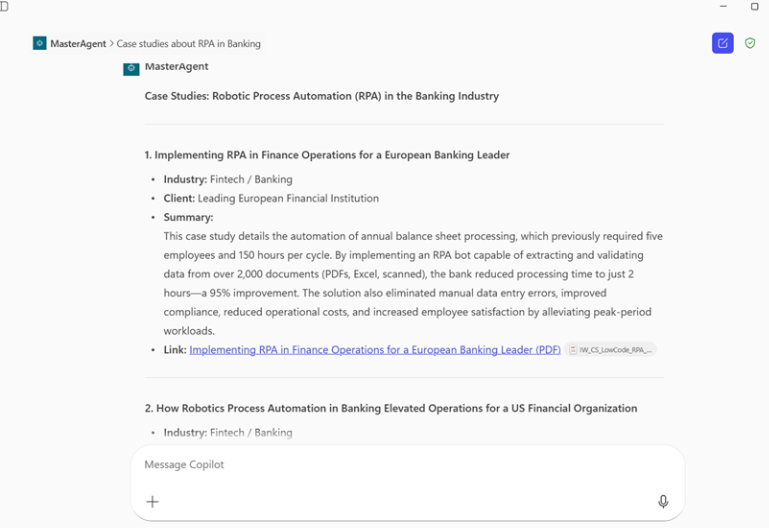
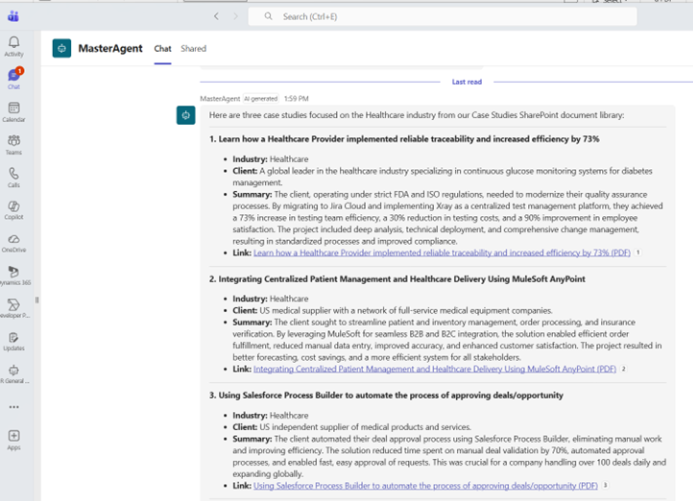
Agents built in Copilot Studio publish to Teams and Microsoft 365 Copilot, so your sales team gets case studies right where they work. No extra app to learn. No portal to forget.
A rep prepping for a retail call can open Teams, ask for case studies, and get a brief before the meeting. That’s the real win: help that lives inside tools people already use. IWConnect’s AI Center of Excellence builds this kind of built-in smarts for teams in many fields. For more, see our AI and RPA case study.
What Are the Benefits, and What Should You Know First?
This setup cuts case study retrieval/creation from days to minutes, but it needs clean CRM data and tidy SharePoint libraries to work well. That’s worth knowing upfront. If your D365 has messy industry tags or thin project records, the output will show it.
When the data is solid, sales and marketing stop digging through folders for old content. Reuse goes up. Project know-how gets passed on instead of lost.
Each agent gets better on its own. No need to touch the others, and you can plug in new agents later for sources like Azure or outside APIs. The Microsoft Copilot Studio docs are a good place to start.
Frequently Asked Questions
Does this work with CRMs other than Dynamics 365?
The setup uses Dataverse, which is built into D365, so linking Salesforce or HubSpot would mean different setup and configuration. It’s doable, but expect extra work.
How long does setup take?
A clean data environment can be running in two to four weeks. If your setup has many units and custom fields, expect it to take longer.
Can the AI match our brand voice?
Yes, to a point. The Generator Agent takes tone and format rules you set up. It won’t perfectly replicate a senior writer, but it produces clean drafts that are faster to polish than starting from scratch.