01
Application integration
Connect cloud and on-premise systems, custom applications, databases, SaaS platforms, and enterprise services so information and business actions flow across the organization.
IWConnect designs and delivers integration architecture that connects applications, APIs, workflows, message brokers, event streams, cloud services, and AI agents into one secure, observable, well-governed enterprise backbone.
The Integration Practice connects different software applications and systems so they work together reliably. The emphasis is on application integration first, supported by process automation, API governance, asynchronous messaging, and event-driven architecture.
Connect cloud and on-premise systems, custom applications, databases, SaaS platforms, and enterprise services so information and business actions flow across the organization.
Model, automate, optimize, and monitor business processes using BPMN, workflow tasks, approvals, transitions, and integration with enterprise applications.
Create, publish, secure, monitor, and analyze APIs with clear policies for authentication, traffic control, access control, transformation, and developer enablement.
Route, transform, and manage messages between systems using asynchronous communication, queueing, publish-subscribe, request-reply, and point-to-point patterns.
Build real-time event-driven systems that persist event logs, process streams, enable strong ordering, and support microservices, IoT, analytics, and operational automation.
Expose enterprise capabilities safely to LLMs and agents through governed APIs, MCP servers, LLM gateways, RAG pipelines, event triggers, policy controls, and observability.
Message brokers and event streaming both decouple systems, but they solve different problems. Knowing which one fits a workload keeps systems decoupled without adding the wrong kind of complexity.
AI integration is more than adding an LLM to a workflow. It needs secure tool access, API governance, model routing, auditability, cost control, prompt and response observability, event triggers, and patterns that protect core systems.
A production-ready stack is not a single platform. It is a set of cooperating layers that separate consumers, gateways, tools, orchestration, integration platforms, observability, and systems of record.
IWConnect combines SnapLogic, MuleSoft, APIs, gateways, MCP, custom services, RAG, and observability into a practical delivery model for AI-enabled integration.
Add classification, summarization, enrichment, routing, exception handling, validation, and intelligent transformation into integration workflows.
Expose enterprise capabilities through secured APIs so agents act through governed interfaces instead of direct backend access.
Centralize model access, apply AI traffic policies, monitor prompts and responses, route models, optimize costs, and enforce data protection.
Create standardized tool and context access for AI clients with enterprise authentication, authorization, versioning, and auditability.
Connect documents, policies, contracts, tickets, and operational knowledge to LLMs with ingestion pipelines, vector search, and retrieval governance.
Trace decisions across prompts, models, APIs, pipelines, tools, and backend systems with logs, dashboards, cost controls, and evidence.
Enterprises need a policy layer between AI applications, model providers, APIs, and backend systems. It protects data, standardizes access, manages spend, and gives teams visibility into every AI-powered transaction.
MCP can become the standardized interface between AI clients, enterprise tools, data resources, and approved prompts, so agents reach systems through governed paths instead of direct access.
Models, agent frameworks, APIs, business systems, regulation, and usage patterns will keep changing. The integration layer should absorb that without forcing every channel, workflow, or backend to be rebuilt.
IWConnect covers the full integration lifecycle: architecture, API definitions, BPMN modeling, event-driven design, transformation, messaging, platform implementation, security, monitoring, and AI-specific controls.
Integration architecture, data flows, communication protocols, API definitions, BPMN process models, event-driven architecture, and reusable patterns.
Transform XML, JSON, CSV, and enterprise payloads, manage workflow tasks, approvals, transitions, and orchestrate process automation across systems.
Design RESTful and GraphQL APIs, define endpoints and data models, and secure access with OAuth 2.0, JWT, API keys, HTTPS, and platform policies.
Implement publish-subscribe, queues, routing rules, stream producers and consumers, event processing, and asynchronous integration patterns.
Build LLM gateways, MCP servers, RAG integrations, policy engines, prompt safety controls, human-in-the-loop actions, and approval flows.
Implement dashboards, logs, alerts, traceability, retries, fallbacks, audit exports, cost tracking, performance monitoring, and reporting.
The methodology keeps business outcomes, system constraints, security, testability, and operational readiness aligned from the first use case to scaled delivery. Select a stage to see what happens in it.
Click each stage to see what happens in it
Identify where AI can assist, decide, summarize, classify, recommend, or automate business processes.
Inventory applications, APIs, data sources, owners, sensitivity, integration points, and operational constraints.
Define pipelines, APIs, gateways, MCP servers, RAG services, event flows, and the target operating model.
Specify access control, masking, approval flows, audit logging, prompt safety, tool scopes, and compliance controls.
Develop integrations, APIs, prompts, MCP tools, model policies, dashboards, CI/CD, and environment promotion.
Run functional, integration, performance, security, prompt-injection, fallback, and AI output validation tests.
Release safely, monitor usage, manage incidents, track costs, measure outcomes, and optimize continuously.
Create reusable connectors, API products, prompt libraries, MCP tools, reference architectures, and playbooks.
Each use case needs the right pattern based on latency, data sensitivity, agency level, action risk, and business process complexity.
Source system to integration pipeline to AI enrichment to validation to target system. Best for classification, summarization, transformation, and routing.
User to AI agent to LLM gateway to API gateway to backend system. Best for assistants that execute business actions through controlled interfaces.
AI client to MCP server to approved tool, API, or pipeline to enterprise system. Best for reusable tool discovery and permissioned actions.
Documents and data to indexing to vector search to LLM to governed answer or workflow action. Best for policies, contracts, and tickets.
AI recommendation to business approval to pipeline execution to audit log. Best for regulated, high-impact, or exception-heavy decisions.
Business event to message queue or stream to AI decisioning to API or workflow action. Best for near-real-time operational scenarios.
IWConnect works across the major integration, messaging, streaming, API, and AI platforms, and helps teams choose the right combination for their stack instead of forcing a single vendor.
Connected applications, APIs, events, and AI workflows prove their value where systems, documents, decisions, and actions intersect.
AI and event-driven integrations can trigger real enterprise actions. That makes policy, validation, observability, and auditability core parts of the architecture.
Pete auto-generates Confluence documentation for your SnapLogic projects, turning a click into comprehensive docs in under a minute and removing the manual documentation bottleneck.
Let IWConnect design the integration backbone for your applications, processes, APIs, event streams, AI agents, and governed enterprise actions.
IWConnect pairs a long track record in enterprise integration with the architecture, governance, and platform depth that AI-era systems demand.
Deep integration experience across industries, platforms, process patterns, application landscapes, and delivery models.
No generic blueprint. Architecture, platform choice, governance, and delivery are shaped around business and technical constraints.
Reusable patterns, platform expertise, and a practical methodology help teams move from discovery to working integration faster.
Reduce friction between teams, systems, applications, data, APIs, AI tools, and operational workflows.
AI agents and copilots are only useful when they can reach enterprise data and take actions in real systems. An integration layer with API gateways, an LLM gateway, MCP tools, and governed pipelines gives AI controlled, observable access to applications, data, and events, without hard-wiring models into every system.
No. The reference architecture adds an AI layer on top of your existing iPaaS, messaging, and API management. We work with the platforms you already run rather than forcing a rip-and-replace.
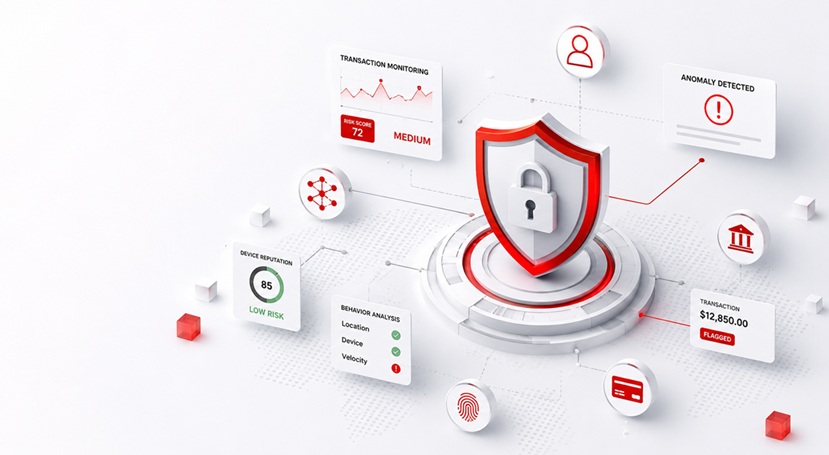
Access runs through gateways with authentication, rate limits, token budgets, PII redaction, tool scopes, approval flows, and audit logging. AI calls are governed and traceable the same way regular API traffic is.
An LLM gateway centralizes which model providers are allowed, applies budgets and redaction, and logs every call. An MCP server exposes approved tools to agents in a versioned, permissioned way, so agents act through controlled interfaces instead of ad hoc connections.
Yes. We support major integration, messaging, streaming, API management, BPM, and cloud platforms, including SnapLogic, MuleSoft, Boomi, Kafka, and the main API gateways, and help you choose the right combination rather than a single vendor.
Through a structured methodology that covers discovery, systems mapping, architecture and security design, build, validation and testing, deployment and operations, and reuse, so AI integration is testable, observable, and supportable in production rather than a demo.
✕
By signing up for the waiting list now, you'll secure your spot for early access and claim these valuable benefits.