

When working with Boomi components, understanding what changed between revisions is an important part of development, review, and deployment. A small change in a process, map, connector, or routing path can affect how the integration behaves, so being able to compare revisions clearly is very useful before promoting changes to another environment.
Boomi already provides a helpful capability for this through Boomi GPT. From the Revision History panel, a developer can ask Boomi GPT to summarize the changes between two revisions of a component.
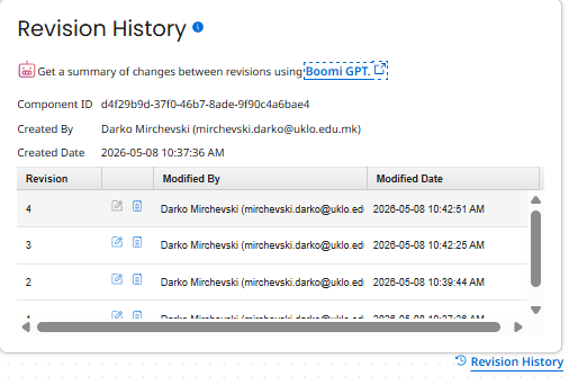
The result is easy to understand because it explains the difference in human language instead of forcing the user to manually compare every shape and connection.
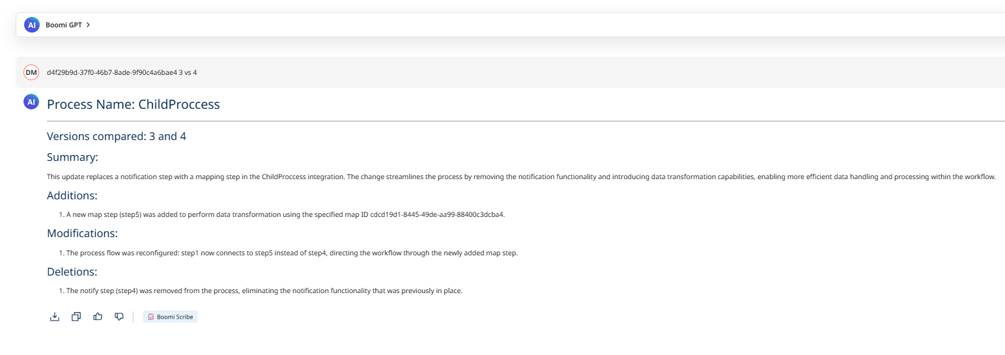
For example, Boomi GPT can explain that a notification step was removed, a map step was added, or that the process routing was changed. This is very useful when a developer is manually reviewing a component inside the Boomi UI.
However, this feature is UI-driven. The Boomi GPT revision summary is available from the web interface, but it is not exposed as a programmatic API that can be called directly from CI/CD pipelines, release workflows, governance checks, or other automation processes. This means the feature is powerful, but still manual.
At the same time, Boomi does provide a programmatic way to compare component versions through the ComponentDiffRequest endpoint. This endpoint allows us to send a component ID, source version, and target version, and receive the technical differences between those two component revisions.
For example:
{
  "componentId": "d4f29b9d-37f0-46b7-8ade-9f90c4a6bae4",
  "sourceVersion": "3",
  "targetVersion": "4"
}
The challenge is that the ComponentDiffRequest response is very raw. It returns a technical diff structure containing objects like GenericDiff, addition, deletion, modification, elementName, changedParticleName, oldValue, newValue, and XPath references.
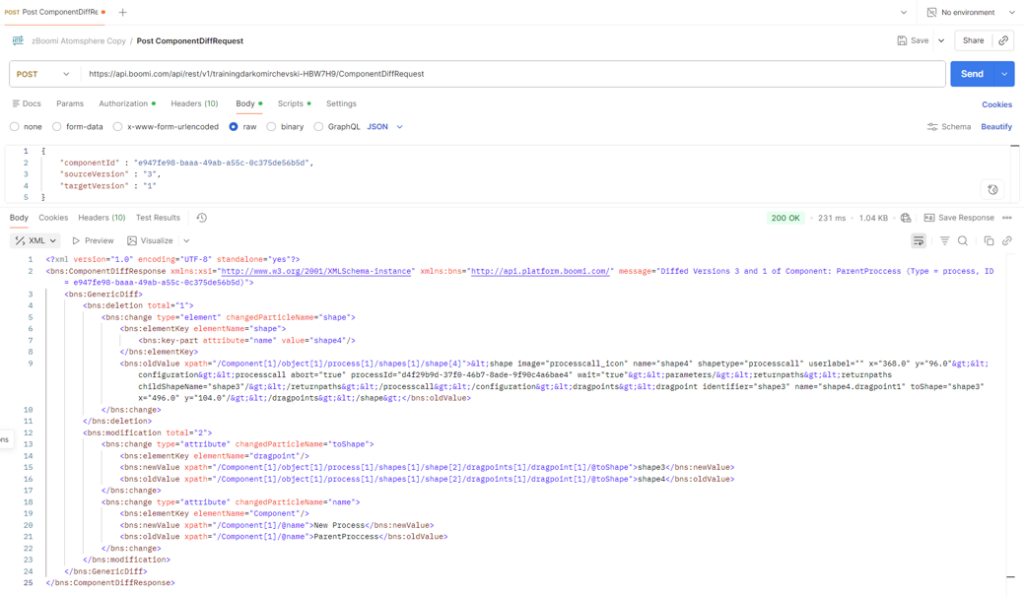
This data is accurate and useful, but it is not easy to read directly. For example, the API may tell us that a shape element was added, another shape element was deleted, and a dragpoint attribute changed from shape4 to shape5. Technically, that is correct. But from a user perspective, the real meaning is that a notify step was replaced with a map step, and the process flow was rerouted through the new map shape.
That is the gap this Boomi Agent solves.
The core of the implementation is the ComponentDiffRequest endpoint. The agent uses this endpoint as the source of truth for retrieving component version differences. Instead of trying to access the Boomi GPT revision-summary feature directly, the agent uses the official programmatic diff capability that Boomi already exposes.
The Boomi Agent then acts as an interpretation layer on top of the raw ComponentDiffRequest response. It reads the additions, deletions, modifications, XML fragments, changed attributes, element names, and XPath references, then converts them into a clean revision summary that is much easier to understand.
This gives us the best of both approaches.
Boomi GPT shows how useful a clear revision summary can be for manual review.
ComponentDiffRequest gives us the official programmatic source for component differences.
Boomi AgentStudio allows us to transform that raw technical diff into a production-ready, automation-friendly summary.
The agent accepts one or more component comparison requests as input. Each request contains the component ID, the source version, and the target version. This means the agent can compare multiple components in one execution, which is useful when reviewing a full release package or validating changes before deployment.
Example input to the agent:
[
  {
    "componentId": "e947fe98-baaa-49ab-a55c-0c375de56b5d",
    "sourceVersion": 1,
    "targetVersion": 3
  },
  {
    "componentId": "d4f29b9d-37f0-46b7-8ade-9f90c4a6bae4",
    "sourceVersion": 3,
    "targetVersion": 4
  }
]
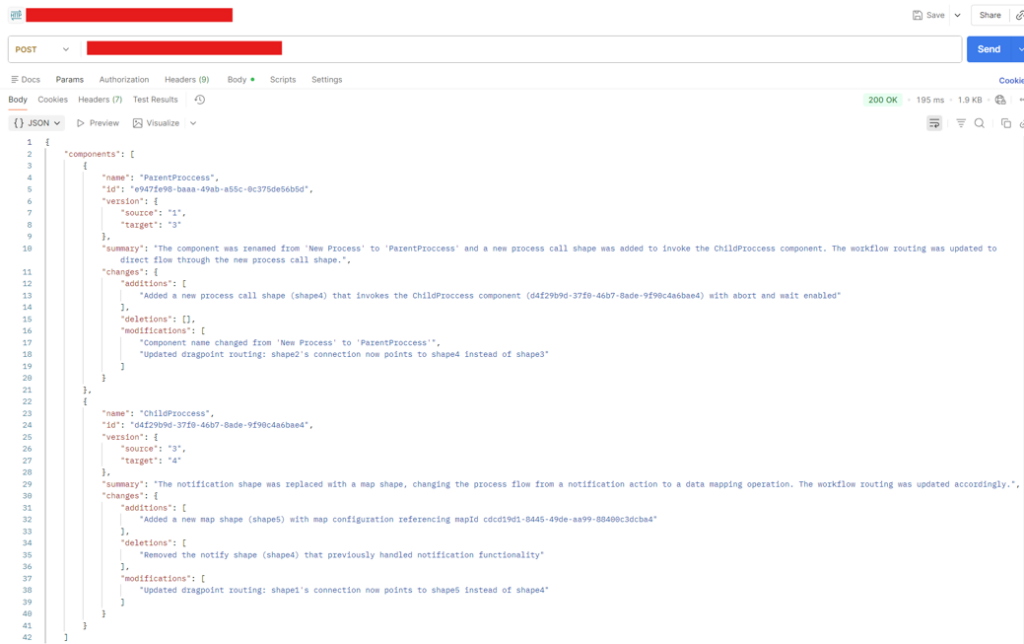
Instead of returning the raw GenericDiff response, the agent returns a structured and readable output. Each component includes the component name, component ID, compared versions, an overall summary, and categorized changes for additions, deletions, and modifications.
Example output:
{
  "components": [
    {
      "name": "ParentProccess",
      "id": "e947fe98-baaa-49ab-a55c-0c375de56b5d",
      "version": {
        "source": "1",
        "target": "3"
      },
      "summary": "The component was renamed from 'New Process' to 'ParentProccess' and a new process call shape was added to invoke the ChildProccess component. The workflow routing was updated to direct flow through the new process call shape.",
      "changes": {
        "additions": [
          "Added a new process call shape (shape4) that invokes the ChildProccess component (d4f29b9d-37f0-46b7-8ade-9f90c4a6bae4) with abort and wait enabled"
        ],
        "deletions": [],
        "modifications": [
          "Component name changed from 'New Process' to 'ParentProccess'",
          "Updated dragpoint routing: shape2's connection now points to shape4 instead of shape3"
        ]
      }
    },
    {
      "name": "ChildProccess",
      "id": "d4f29b9d-37f0-46b7-8ade-9f90c4a6bae4",
      "version": {
        "source": "3",
        "target": "4"
      },
      "summary": "The notification shape was replaced with a map shape, changing the process flow from a notification action to a data mapping operation. The workflow routing was updated accordingly.",
      "changes": {
        "additions": [
          "Added a new map shape (shape5) with map configuration referencing mapId cdcd19d1-8445-49de-aa99-88400c3dcba4"
        ],
        "deletions": [
          "Removed the notify shape (shape4) that previously handled notification functionality"
        ],
        "modifications": [
          "Updated dragpoint routing: shape1's connection now points to shape5 instead of shape4"
        ]
      }
    }
  ]
}
This makes the revision comparison much more practical. A developer can understand the actual change without reading raw XML. A release reviewer can quickly see what was added, removed, or modified. A CI/CD workflow can call the agent and store the result as release documentation. A governance process can use the response as part of an approval step before deployment.
This is especially useful for teams that use CI/CD and pull request workflows. Since the agent output is structured, it can be used to automatically generate a change summary table inside the PR description. Instead of reviewers opening Boomi, checking revision history manually, and interpreting raw component differences, the PR can already contain a clear list of what changed for each component.
For example, a CI/CD workflow could compare the source and target versions of all changed components, call the Boomi Agent, and write the result directly into the pull request description. The PR could include the component name, source version, target version, summary, additions, deletions, and modifications. This gives reviewers immediate visibility into the impact of the change before approving the merge.
The goal is not to replace Boomi GPT. The goal is to take the same idea of clear revision explanation and make it available in a programmable, reusable, and automation-friendly way.
Boomi GPT provides the manual summary experience.
ComponentDiffRequest provides the raw programmatic diff.
The Boomi Agent connects both ideas by turning raw technical changes into clear revision summaries that can be used in real delivery workflows.
Building the Component DiffChecker Agent in Boomi AgentStudio
After defining the problem, the next step was to create a Boomi Agent that can convert raw component diff data into a structured revision summary. The agent was created in Boomi AgentStudio and named Component DiffChecker.

The purpose of this agent is simple: receive one or more Boomi component comparison requests, call the ComponentDiffRequest endpoint for each component, analyze the returned diff response, and produce a clean summary of what changed.
The agent does not perform the version comparison itself. That comparison still comes from Boomi’s ComponentDiffRequest endpoint. The agent’s role is to interpret the raw response and make it understandable.
Agent Profile
The agent profile defines the basic behavior of the agent.
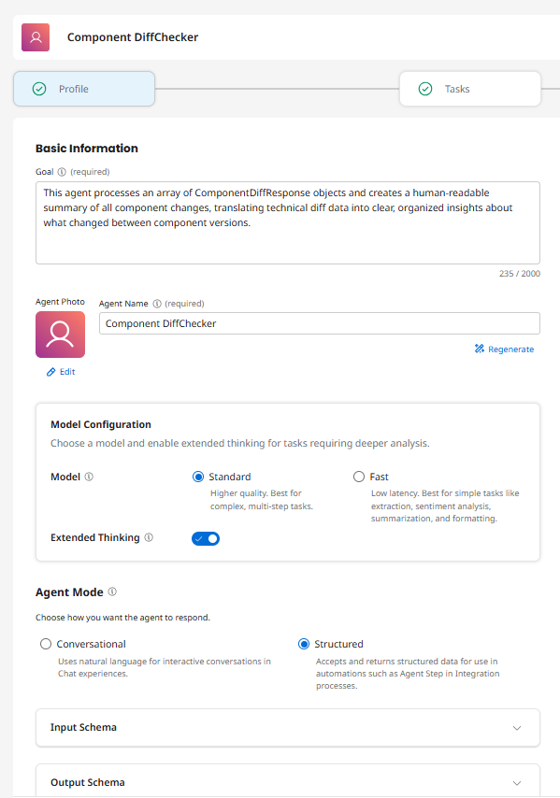
The agent goal was defined as:
This agent processes an array of ComponentDiffResponse objects and creates a human-readable summary of all component changes, translating technical diff data into clear, organized insights about what changed between component versions.
For this implementation, the agent was configured in Structured mode. This is important because the output is not meant to be a normal conversational response. The response needs to be a predictable JSON that can later be consumed by another Boomi process, an API client, a CI/CD workflow, or a pull request automation step.
The model was configured with Standard mode and Extended Thinking enabled. This helps because the agent needs to analyze raw technical diff responses, read XML fragments, understand element changes, identify routing updates, and then produce a clean summary.
Input Schema
The input schema defines what data the agent expects to receive.
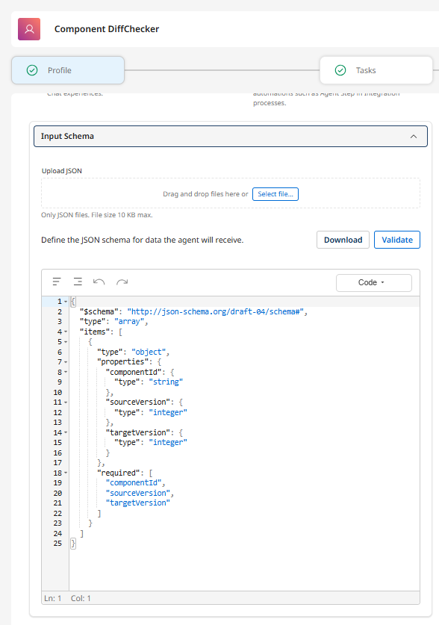
The agent input is an array. Each object in the array represents one component comparison request.
[
  {
    "componentId": "e947fe98-baaa-49ab-a55c-0c375de56b5d",

    "sourceVersion": 1,
    "targetVersion": 3
  },
  {
   "componentId": "d4f29b9d-37f0-46b7-8ade-9f90c4a6bae4",

    "sourceVersion": 3,
    "targetVersion": 4
  }
]
Each request contains three fields.
componentId identifies the Boomi component that should be compared.
sourceVersion represents the older version of the component.
targetVersion represents the newer version of the component.
The important part of this design is that the agent can receive multiple component comparison requests in one execution. This is useful when reviewing a full release package where more than one Boomi component has changed.
Output Schema
The output schema defines the response that the agent must return.
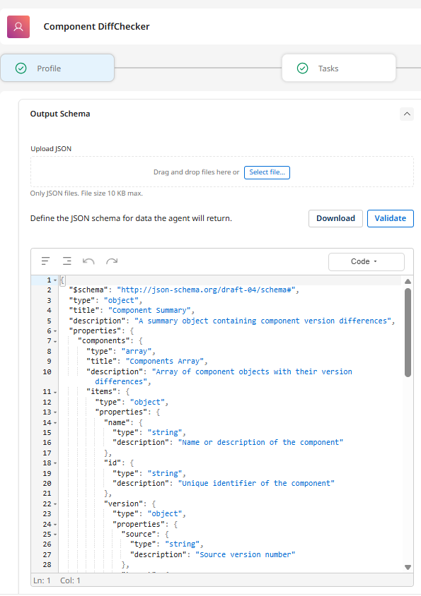
The output contains a components array. Each item in the array represents the summarized result for one component comparison.
Each component contains the component name, component ID, compared versions, an overall summary, and grouped changes.
{
  "components": [
    {
      "name": "Component Name",
      "id": "component-id",
      "version": {
        "source": "1",
        "target": "3"
      },
      "summary": "Short readable explanation of the revision difference.",
      "changes": {
        "additions": [],
        "deletions": [],
        "modifications": []
      }
    }
  ]
}
The changes object is split into additions, deletions, and modifications. This makes the result easier to read and easier to reuse later.
Task Configuration
The agent has one main task: Analyze Component Differences.
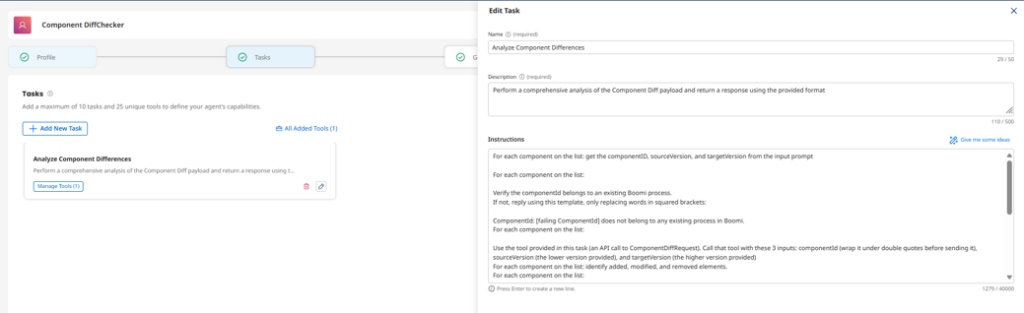
This task tells the agent how to process the input. For each component in the input list, the agent reads the componentId, sourceVersion, and targetVersion. It then calls the API tool connected to ComponentDiffRequest.
The task instructions are important because the raw response from ComponentDiffRequest is technical. The response includes additions, deletions, modifications, XML fragments, element names, changed particle names, old values, new values, and XPath references. Without clear task instructions, the agent may summarize too generally or miss details.
The task instructs the agent to identify what was added, modified, and removed for each component, then return the result using the configured output schema.
API Tool Configuration
The agent uses one API tool named API Call to ComponentDiffRequest.
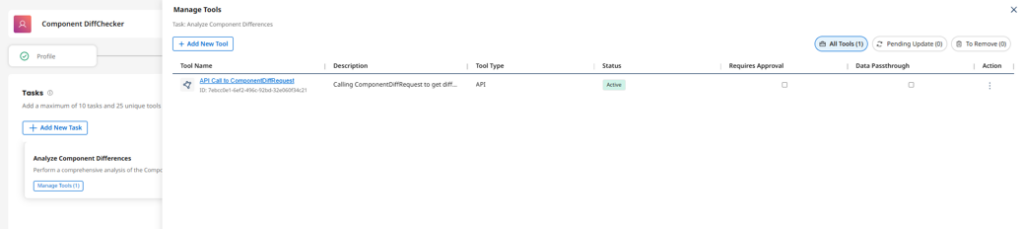
This tool is responsible for calling the Boomi Platform API endpoint that compares two component versions.
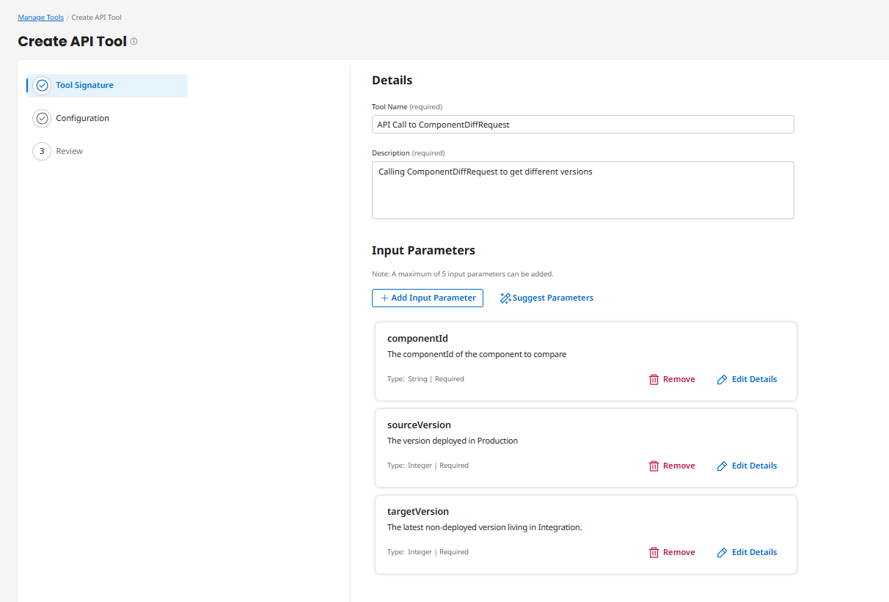
The tool accepts three input parameters:
componentId
sourceVersion
targetVersion
These values come from the agent input and are passed to the API request.
The tool is configured as a POST request to the ComponentDiffRequest endpoint.
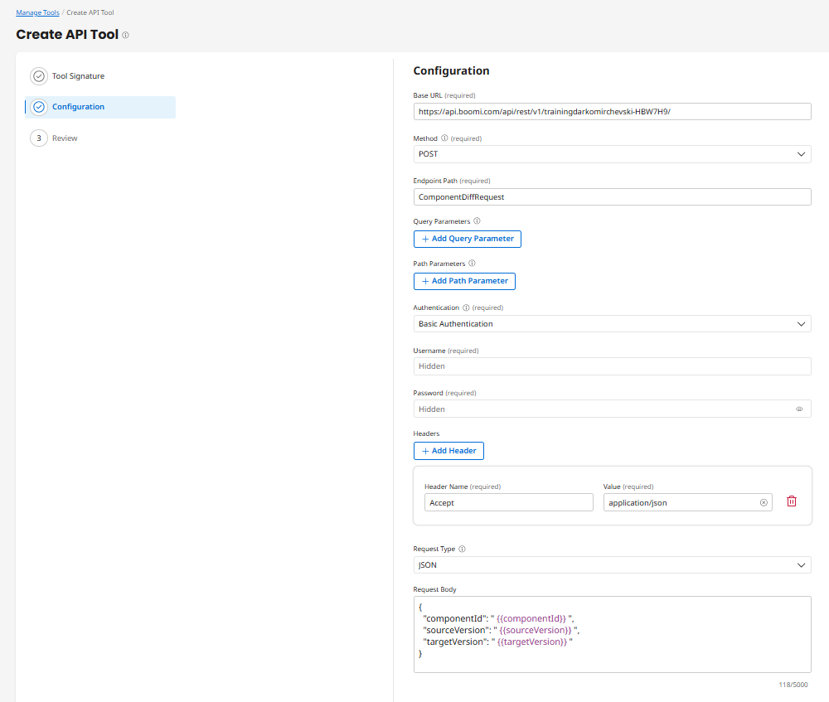
The request body uses the values passed from the agent:
{
  "componentId": "{{componentId}}",
  "sourceVersion": "{{sourceVersion}}",
  "targetVersion": "{{targetVersion}}"
}
The API returns the raw ComponentDiffResponse. This response is then analyzed by the agent and transformed into the final structured summary.
Guardrails
The agent also includes a guardrail configuration.
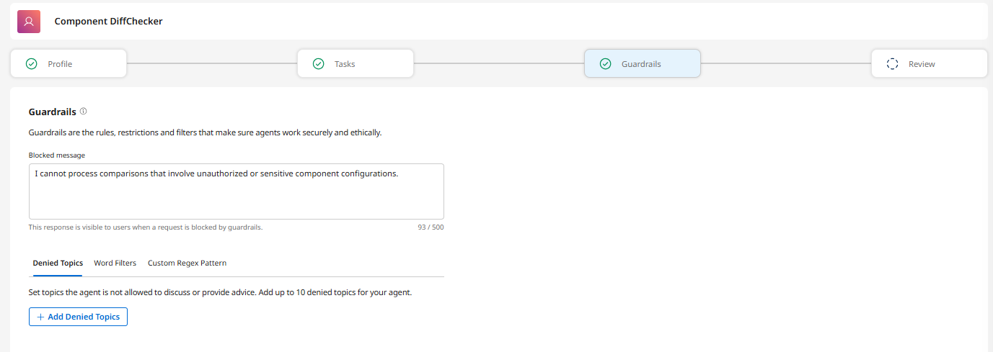
Even though this agent uses structured input and output, guardrails are still useful. The schema controls the format of the request and response, but guardrails help keep the agent inside the intended scope.
For this use case, the guardrails can stay simple. The agent should only process Boomi component revision comparison requests. It should not answer unrelated questions, expose sensitive configuration details, or process unauthorized component comparisons.
A blocked message can be used for requests that are invalid or outside the intended scope:
I cannot process this request because the component comparison is unauthorized, invalid, or outside the allowed Boomi component revision analysis scope.
Example Execution
Once the agent is configured, it can receive multiple component comparison requests in one call.
Example input:
[
  {
    "componentId": "e947fe98-baaa-49ab-a55c-0c375de56b5d",
    "sourceVersion": 1,
    "targetVersion": 3
  },
  {
    "componentId": "d4f29b9d-37f0-46b7-8ade-9f90c4a6bae4",
    "sourceVersion": 3,
    "targetVersion": 4
  }
]
The agent calls ComponentDiffRequest for each component and returns a structured summary.
{
  "components": [
    {
      "name": "ParentProccess",
      "id": "e947fe98-baaa-49ab-a55c-0c375de56b5d",
      "version": {
        "source": "1",
        "target": "3"
      },
      "summary": "The component was renamed from 'New Process' to 'ParentProccess' and a new process call shape was added to invoke the ChildProccess component. The workflow routing was updated to direct flow through the new process call shape.",
      "changes": {
        "additions": [
          "Added a new process call shape (shape4) that invokes the ChildProccess component (d4f29b9d-37f0-46b7-8ade-9f90c4a6bae4) with abort and wait enabled"
        ],
        "deletions": [],
        "modifications": [
          "Component name changed from 'New Process' to 'ParentProccess'",
          "Updated dragpoint routing: shape2's connection now points to shape4 instead of shape3"
        ]
      }
    },
    {
      "name": "ChildProccess",
      "id": "d4f29b9d-37f0-46b7-8ade-9f90c4a6bae4",
      "version": {
        "source": "3",
        "target": "4"
      },
      "summary": "The notification shape was replaced with a map shape, changing the process flow from a notification action to a data mapping operation. The workflow routing was updated accordingly.",
      "changes": {
        "additions": [
          "Added a new map shape (shape5) with map configuration referencing mapId cdcd19d1-8445-49de-aa99-88400c3dcba4"
        ],
        "deletions": [
          "Removed the notify shape (shape4) that previously handled notification functionality"
        ],
        "modifications": [
          "Updated dragpoint routing: shape1's connection now points to shape5 instead of shape4"
        ]
      }
    }
  ]
}
This response is much easier to use than the original GenericDiff response. Instead of reading XML fragments and XPath values, the user receives a clear explanation of what changed.
Using the Component DiffChecker Agent in a Boomi Process
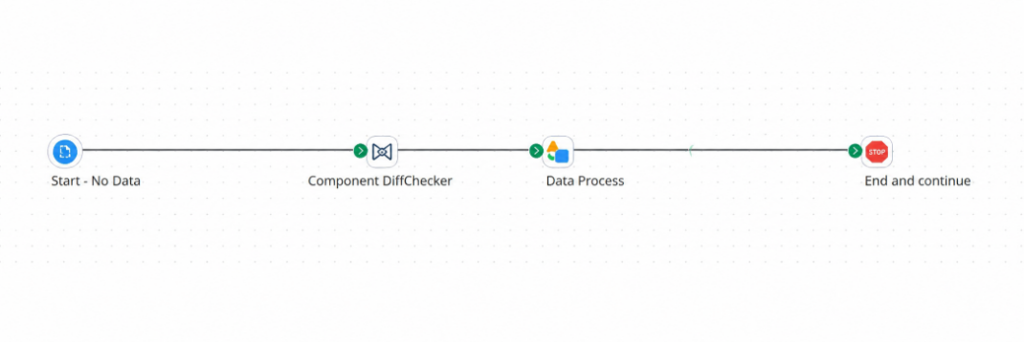
After the Component DiffChecker agent is created, tested, and deployed, it becomes available in the Boomi agent list. At this point, the agent can be used directly inside a Boomi Integration process by using the Agent step.
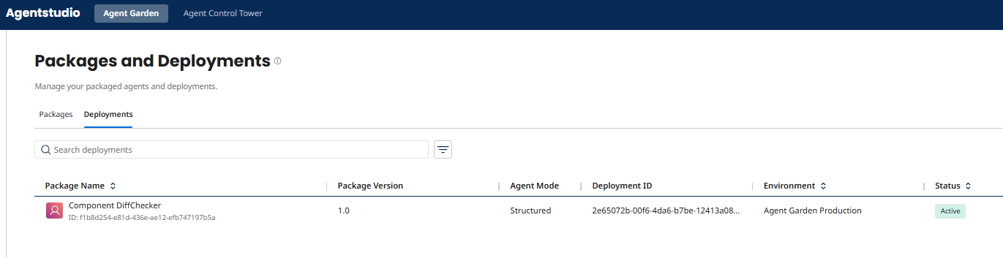
The reason for adding the agent into a Boomi process is to make the solution reusable outside AgentStudio. The agent itself can analyze component differences, but external clients or CI/CD workflows should not need to open AgentStudio manually. Instead, they should be able to call a normal Boomi process or API endpoint.
In this process, the request is passed into the Component DiffChecker Agent step. The agent performs the component comparison analysis and returns the structured revision summary. A Data Process step can then be used if any additional formatting or response preparation is needed before the process ends.
At a high level, the process flow is simple:
Start → Component DiffChecker Agent → Data Process → End
The full runtime flow looks like this:
↓
Boomi API Process
↓
Agent Step
↓
Component DiffChecker Agent
↓
ComponentDiffRequest API
↓
Structured Revision Summary
The important point is that the Boomi process acts as a wrapper around the agent. This allows the agent to be exposed through a normal Boomi integration flow instead of being used only from AgentStudio.
Once this process is exposed as an API, external clients, CI/CD workflows, pull request automation, or release governance tools can send component comparison requests and receive the structured summary response.
Final Thoughts
This solution makes Boomi component revision summaries reusable outside the Boomi UI.
Boomi GPT gives a great manual summary experience, while ComponentDiffRequest gives programmatic access to the raw diff. The Component DiffChecker Agent connects both by turning the raw technical response into a clear structured summary.
Once the agent is called from a Boomi process and exposed as an API, the same summary can be used by CI/CD pipelines, pull request workflows, release documentation, or governance approvals.
Instead of manually checking revision history or reading raw GenericDiff data, teams can call one API and receive a readable explanation of what changed.
With this approach, Boomi component changes become part of the delivery pipeline, not just something reviewed manually inside the platform.