
Enterprise Data AI — Semantic Layer

Engineering Risk Intelligence

Your DevOps Research Analyst. A flashlight on hidden risks and smoke.

DevOps tells you how you're performing technically.


PrismAI tells you where you are losing money - and shows you the optimal way to deal with it.


  • PrismAI is not another technical report - it's a flashlight focused on hidden risks and "smoke".
  • PrismAI builds intelligence from your DevOps data - see where you'll have burnout or knowledge silos.
  • PrismAI shows "what actually happens" - convert RCAs to facts vs intuition.

PrismAI engineering performance metrics

  • 4–7days Deployment frequency High performer tier
  • 24h Lead time from commit to production Average across all repositories
  • 10.7% Change failure rate 15 of 140 deployments
  • 2.4h Mean time to recovery Across 4 incidents
The human factor

Go beyond code. Understand the health of your teams.

Most engineering tools stop at the commit. PrismAI goes further - analyzing the signals that predict burnout, attrition, and knowledge concentration before they become your next crisis.

Early Warning System

PrismAI analyzes signals of burnout and identifies "Knowledge Silos" where critical systems depend on a single person. Identify risk before it turns into attrition or system outages. The bus factor isn't just a technical metric - it's a business continuity risk that Prism surfaces continuously, not after the resignation letter arrives.

The Money Factor

Every incident has a price tag. Most leaders never see it.

PrismAI converts engineering incidents into euros. Duration × hourly rate × engineers involved, per incident, per file, per quarter. €536 average cost per incident. €6,428 in one period. Your board can now see the real cost of technical debt.

The "Cost by Root Cause File" chart tells you which two files are responsible for the majority of your incident spend. So you fix the right thing, not the loudest thing.

PrismAI · The Money Factor

What did last quarter's incidents actually cost?

PrismAI turns every incident into a number and shows its working: time to resolve, the engineers pulled in, and their fully loaded cost. Set your figures below to see the quarterly total most boards never get to see.

Your incident profile

Use the numbers your incident tool already reports.

12
2.4 h
3
€75
This quarter Incident cost
Cost of last quarter's incidents €6,480
€540 Cost per incident
€25,920 Annualized
346 h Engineer time per year
Transparent calculation Auditable, per incident
2.4 h × 3 engineers × €75 × 12 incidents

Figures are directional, based on the inputs above. PrismAI calculates this from your own incident, Git, and Jira data, then names the specific files driving the cost so you fix the right thing, not the loudest thing.

Pipeline Health

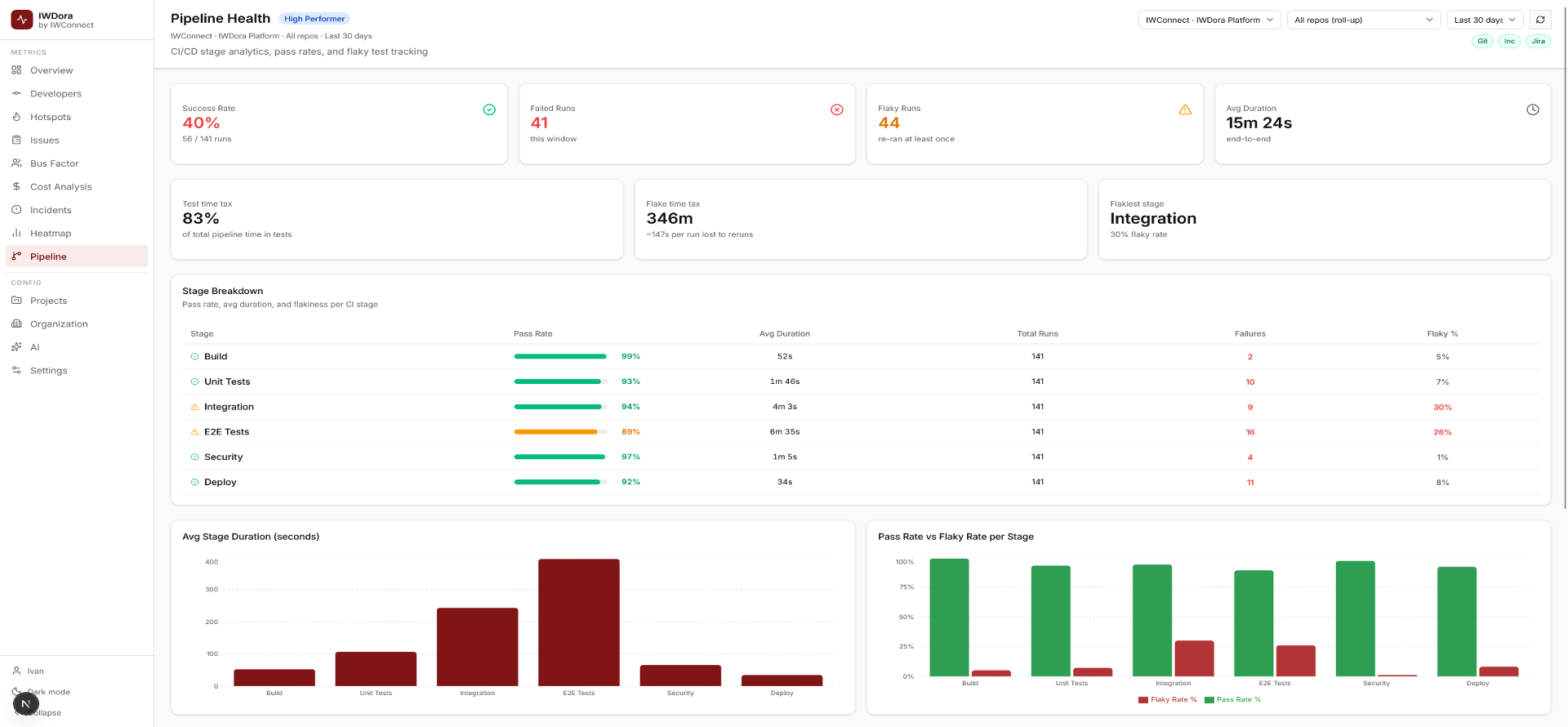
346 minutes lost to flaky tests. Every sprint.

Pipeline Health shows you CI/CD stage analytics, pass rates, and flaky test tracking, broken down by Build, Unit Tests, Integration, E2E, Security, and Deploy. 83% of total pipeline time is in tests. The Integration stage is your flakiest at 30%.

These aren't vanity metrics. Each flaky run is a developer context switch, a delayed deployment, and a confidence loss in your CI pipeline. Prism names the problem, quantifies the cost, and points to the fix.

Prism Pipeline Health - CI/CD Stage Analytics
Six Answers Your Tools Can't Give You Today

PrismAI refracts your DevOps data into six answers your tools can't give you today.

PrismAI connects GitHub or GitLab, PagerDuty or OpsGenie, and Jira, then calculates what those tools individually can't show. Every calculation is transparent and auditable.

  1. Answer 01

    Which files are causing most of your incidents?

    A risk score per file combining change frequency, incident count, and author concentration. The file your team keeps patching is named and ranked.

    commit frequency × incident count × author concentration
  2. Answer 02

    What did last quarter's incidents actually cost?

    Every incident converted to euros: engineer hours, hourly rate, resolution time, and affected file. CFO-ready numbers, not gut-feel estimates.

    duration × hourly rate × team size = € per incident
  3. Answer 03

    Is your team shipping faster or slower?

    PrismAI metrics are calculated automatically and benchmarked against Elite, High, Medium, and Low industry tiers. They stay current without being assembled manually before a review.

    PrismAI tier vs State of DevOps benchmark
  4. Answer 04

    What happens when your best engineer leaves?

    Single-author files are flagged proactively before a resignation turns bus factor into a crisis. Continuous analysis replaces post-departure emergency work.

    single-author detection + AI risk flag
  5. Answer 05

    Are your on-call patterns creating a reliability risk?

    After-hours deploys, weekend commit heatmaps, and on-call concentration identify teams operating unsustainably before it becomes burnout or an outage.

    after-hours % + weekend commits + on-call distribution
  6. Answer 06

    A summary your board can read without a translator.

    Monthly engineering health digest. Quarterly C-suite report with AI narrative and one top action. Leadership gets answers, not dashboards.

    automated PDF · AI narrative · quarterly Prism benchmark
Before and After

Five questions. Two very different answers.

These are the questions your leadership asks before every quarterly review, and the honest answers most engineering teams give today.

Comparison of leadership engineering questions, current manual answers, and answers available with PrismAI.
Question from leadership Today With PrismAI
Is our team getting faster or slower? Prism metrics are assembled manually the week before the review. They are usually presented with “we think.” Automated PrismAI trend, always current: Elite, High, Medium, or Low against the State of DevOps benchmark.
Which code causes most of our outages? Unknown. Post-mortems name symptoms. The actual files are never identified. File risk score combining commit history and incident count. The top 2–5 files are named, ranked, and reported monthly.
What did our incidents cost last quarter? Engineer time is never converted to money. The cost stays invisible until it repeats. Incident cost equals duration × hourly rate × severity. It is calculated per incident, per file, and per quarter, ready for CFO review.
What happens if our lead engineer leaves? Nobody knows until it happens. Emergency knowledge transfer starts under pressure. Continuous bus-factor analysis. Single-author files are flagged before any resignation forces the issue.
Are we getting value from our tooling spend? €60–80 per developer per month across multiple SaaS tools. Calculations are opaque. Self-hosted. No per-seat fee. All metrics in one deployment with fully transparent, auditable calculations.

Scroll horizontally to compare the full table.

How We Work With You

We handle everything. You read the reports.

Three phases. Clear milestones. No surprises, and zero work for your team. We install it, connect your tools, and send the reports.

  1. Phase 1 · Days 1–5

    We understand your setup before touching anything

    We map your toolchain and document the questions your leadership needs answered.

    • Git platform, incident tool, and Jira reviewed
    • Current SaaS tooling cost versus PrismAI compared
    • Deployment plan confirmed, not a generic proposal
  2. Phase 2 · Days 6–10

    Live in under 2 hours. First report within days.

    We deploy PrismAI, connect your tools, and deliver your first engineering health report fast.

    • All connectors active: Git, incidents, and Jira
    • PrismAI tier classification delivered
    • Top risk files, incident cost, and bus factor in your first report
  3. Phase 3 · Month 2+

    Monthly to engineering. Quarterly to the C-suite.

    Leadership gets a quarterly PrismAI benchmark and an AI-generated board digest, with no translation needed.

    • Monthly engineering health report
    • Quarterly PrismAI benchmark versus industry data
    • Option to take the license or keep us managing it

Why PrismAI?

A prism doesn't change what passes through it - it reveals what was always there. White light enters, and the full spectrum emerges. Your DevOps data already contains the truth about your team's velocity, cost, burnout signals, and hidden risks. Prism breaks it apart into the components you can actually see and act on. The answers were always in your pipeline. Prism just makes them visible.

Want to see it on real data?

One file is causing most of your incidents. Let's show you which one.

We’ll run a live example – top risk files, incident cost, PrismAI tier, bus factor. No commitment. No setup on your side.

FAQ

Frequently asked questions about PRISM.

The questions organizations ask first: what PRISM is, what it measures, what it takes to run, and what it costs you to find out.

The Basics

What You Get

Running It

AI, Commercials & Next Steps