
SnapLogic projects sometimes get hard to follow quickly. Pipelines, tasks, configurations, and interconnected components evolve over time, and as projects grow, it becomes harder to keep everything organized, easy to follow, and accessible to everyone involved. Pete is a SnapLogic documentation tool designed to turn that complexity into structured, readable documentation and review outputs.
Pete helps organizations take their SnapLogic projects and turn them into structured, readable documentation. Instead of digging through systems or relying on fragmented information, everything is brought together into a clear format that can be shared through tools like Confluence, SharePoint, or PDF reports.
What makes this especially useful is that the output isn’t just technical – it’s designed to be understandable. Whether you’re part of the development team or a stakeholder trying to get a clearer picture, Pete helps make project information easier to navigate.
It creates a shared space where everyone can understand what exists and how things are connected.
What Pete Adds Beyond Documentation
Knowing what exists in a project is only part of the picture. Teams often want to understand how well things are structured, whether standards are followed, and if there are areas that could be improved.
This is where Pete introduces something more: Code Review.
Despite the name, Code Review in Pete is not about developers reviewing code manually. It’s an automated process that evaluates how a project is organized and whether it aligns with defined development standards (policies).
And most importantly – it’s not hidden.
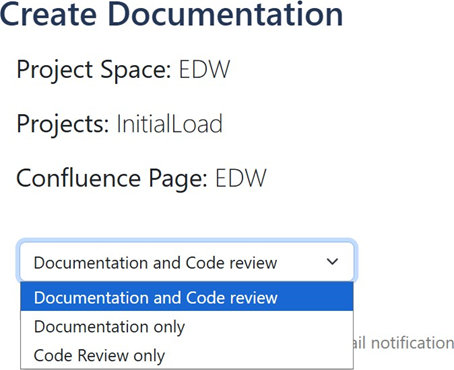
When generating outputs in Pete, users can choose to include Code Review alongside documentation or even generate it on its own. That means the review becomes part of what is delivered, not something happening quietly in the background.
One of the most helpful things about Code Review in Pete is how it’s presented.
Instead of complex data, the results are turned into a structured report. It includes:
- a clear overview of the project,
- code quality and maintainability
- detailed checks with explanations,
- and readable insights into what was found.
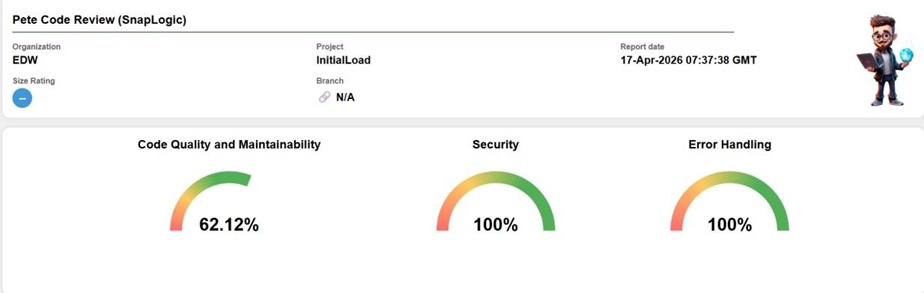
It feels less like a system output and more like a project report – something you can actually read, understand, and discuss.
This makes it useful not just for developers, but for anyone involved in the project.
Here is a simplified example of what a Code Review finding can look like:
Category: Error Handling
Metric: Usage of error handling
Policy: All production pipelines must include an error handling path
Finding: 3 pipelines do not define an error route
Why it matters: Failures can stop processing without clear recovery or logging
Recommendation: Add a standard error handling pattern across the affected pipelines
This is where Pete becomes especially useful: it does not just surface an issue, it explains what was found and why it matters.
Let’s see the main concepts in the Pete Code Review: metrics and policies.
What Are Metrics?
Behind this review process are Metrics – the checks that guide what gets evaluated.
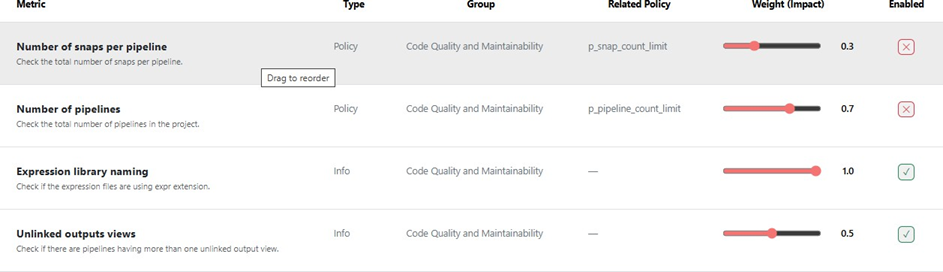
Metrics appear as named review items with outputs, findings, and justifications, and they are grouped into broader categories such as Code Quality and Maintainability, Security, and Error Handling.
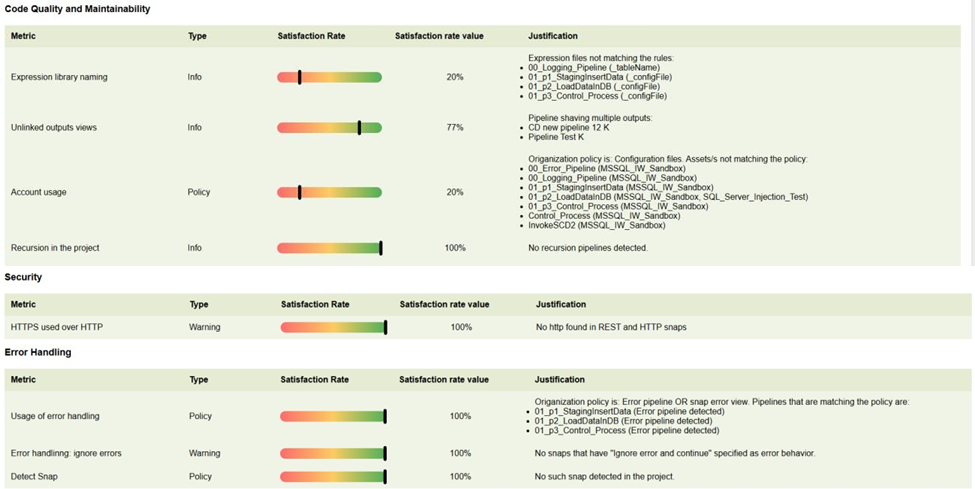
Each metric represents something specific, like:
- how pipelines are organized,
- whether certain patterns are followed,
- or if best practices are implemented.
In the interface, these metrics are clearly listed and easy to understand. They come with descriptions, can be grouped into categories like quality or security, and can even be weighted based on importance.
A simple way to think about metrics is this: they are the checklist the system uses when reviewing a project.
They help answer questions such as:
- What aspects of the project should be looked at?
- Which checks matter more than others?
- How should those checks be organized in the final review?
What Are Policies?
If metrics are the checklist, Policies are the rules behind it.
Policies define what is considered acceptable. They set expectations – like how things should be named, structured, or configured. They define the standards, rules, or expected patterns that an organization wants the review to reflect.
What’s nice is that these are not fixed. They can be adjusted based on the organization’s needs, and they often include examples to make them easier to understand.
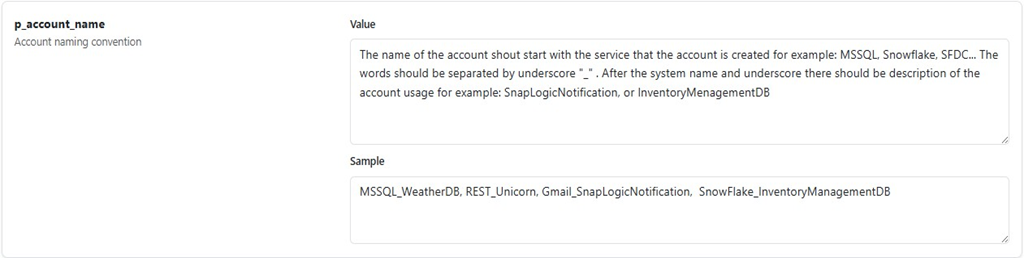
In simple terms, if metrics define what to check, policies help define what “good” looks like.
That could mean naming expectations, allowed patterns, thresholds, or other organization-specific rules. By making these settings configurable, Pete allows the review process to reflect how each organization wants its projects to be assessed, rather than forcing one fixed standard on everyone.
How Metrics and Policies Work Together
The real value comes from how metrics and policies work together.
- Policies set the expectations
- Metrics check those expectations
- The system evaluates the project
- The results are presented in a clear report
This creates a flow where project artifacts are evaluated against organization – defined expectations, the findings are organized into categories, and the result is delivered as a report that includes both summary – level insights and detailed explanations.
What makes Pete stand out is not just that it evaluates projects, but how it presents that evaluation.
Instead of keeping insights hidden or technical, Pete turns them into something that can be shared, discussed, and used. The review becomes part of the documentation, giving teams a more complete view of their work.
It helps answer not just what is in this project, but also how this project is structured and whether the team is following its own standards.
Why Pete?
Before Pete, teams often had to document SnapLogic projects manually, rely on tribal knowledge, or piece information together from multiple places. That slows down onboarding, makes reviews inconsistent, and makes it harder for stakeholders to understand what is actually in the project.
Pete closes that gap by combining documentation, visibility, and structured review in one place.
A Clearer Way to Work with Projects
Pete helps teams understand what a SnapLogic project contains and how that project is being assessed. If you want clearer project visibility and more usable review outputs, Pete gives you a faster way to get there.
Want to see Pete in practice? Explore how Pete can help your team document SnapLogic projects and review them with more clarity.