

The Real QA Challenge – And Why TestRail Became Our Anchor
Small UI changes shouldn’t break your CI pipeline, but they often do. We’d push a minor update, run ~180 Playwright tests in CI, and suddenly see several failures caused by something as simple as a shifted button. Debugging took hours, not because the failures were complex, but because there was no centralized context tying tests, history, and behavior together.
Once we put TestRail at the center and added AI to help analyze and generate tests – our pipeline became faster, more precise, and self-improving.
In this post, I’ll walk through how we integrated Playwright + TestRail + CI/CD + AI into one unified QA system, and why it fundamentally changed how we deliver quality.
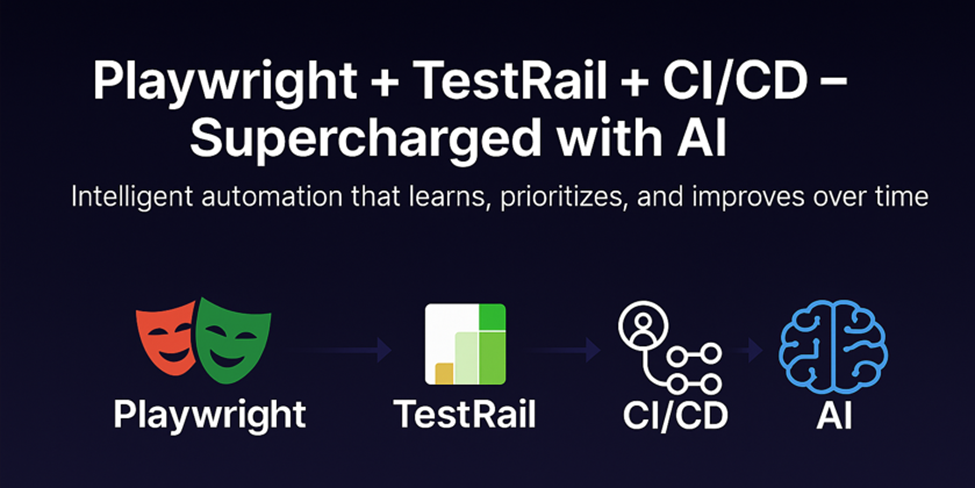
Step 1: The Foundation – Connect Everything Automatically with TestRail
The Goal:
Every code change → tests run → results go to TestRail – automatically.
No copy-paste. No “forgot to update.” Just flow.
In Plain English:
It’s like email automation for testing.
You send an email (push code) → Playwright replies (runs tests) → TestRail archives it (stores results).
TestRail acts as the QA command center, tracking all cases, runs, and results – with real-time API updates that keep your team aligned.
How It Works – With Real Code
1.)TestRail Setup (Your QA Notebook)
Example: Case ID: C1234
Title: “User logs in with correct email and password”
Tag: automation_id=login_positive
Custom Field: ai_risk_score=0.82
Pro Tip: Use TestRail’s bulk import or REST API to upload hundreds of cases directly from CSV or Jira.
2.) Playwright Test (The Robot That Clicks)
 // tests/login.spec.ts
import { test, expect } from '@playwright/test';
 test('Valid login @C1234', async ({ page }) => {
  await page.goto('https://app.iwconnect.com/login');
  await page.fill('input[name="email"]', 'test@iwconnect.com');
  await page.fill('input[name="password"]', 'SecurePass123!');
  await page.click('button[type="submit"]');
  await expect(page.locator('text=Welcome Dashboard')).toBeVisible();
});
Mapped to TestRail: The @C1234 tag links this Playwright test directly to its TestRail case.
3.) GitHub Actions (The Auto-Runner)
Mapped to TestRail: The @C1234 tag links this Playwright test directly to its TestRail case.
3.)GitHub Actions (The Auto-Runner)
4.) Automatic Deployment Before Test Execution
Before Playwright runs, the pipeline automatically deploys the latest build to staging – so every run validates the most recent code.
# Example deployment step added before running tests
- name: Deploy to Staging
  run: |
  docker build -t iwconnect/app:latest .
    docker run -d -p 8080:80 iwconnect/app:latest
 - name: Run Playwright Tests
  run: npx playwright test
Result: Every commit triggers a fresh deployment, executes tests, and reports back to TestRail , no human intervention.

Step 2: Add AI – Make It Think, Not Just Run
Automation makes QA faster.
AI makes QA smarter.
At ⋮IWConnect, we added two AI layers that transform how our pipeline learns and prioritizes, all powered by TestRail as the single source of truth.
1.)AI Writes Test Cases for You (LLM-Powered with Jira + TestRail Integration)
The Problem:
Writing and maintaining test cases across Jira and TestRail manually is slow and inconsistent.
The Fix: LLM + TestRail Automation
We connected Jira, a GPT-based LLM, and TestRail’s REST API into one automated pipeline.
When a new Jira ticket is created or updated, a GenAI service reads it, generates TestRail-ready cases, and posts them directly, with tags, priorities, and risk scores.
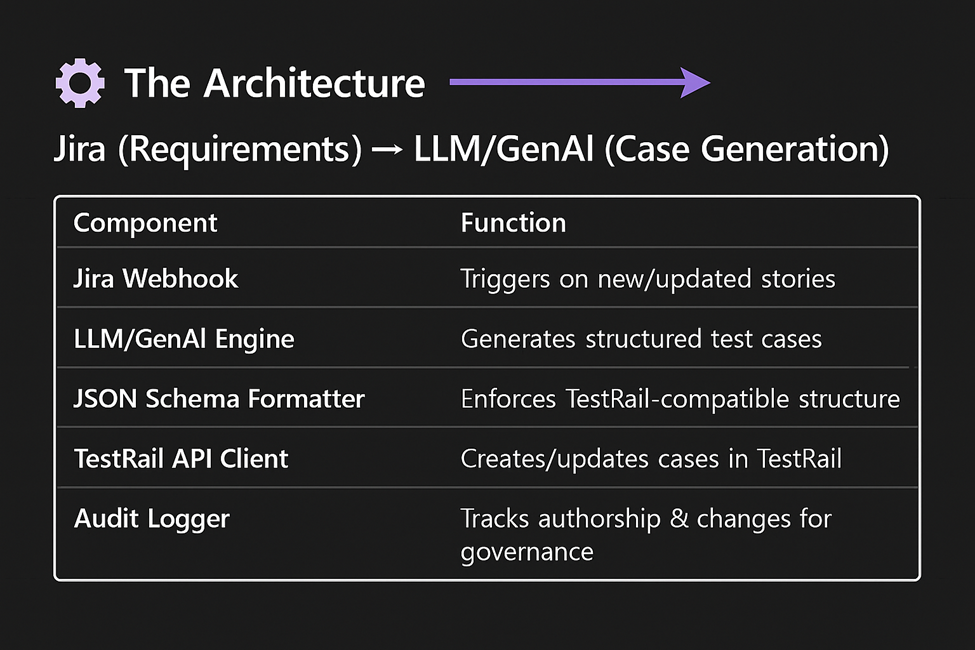
AI Configuration & Model Management
At ⋮IWConnect, every prompt, model, and JSON schema is version-controlled in GitHub.
We track model and schema versions (e.g., gpt-4o-mini@v3 / prompt@1.6 / schema@2.1) and fine-tune based on feedback from QA reviewers. This ensures repeatability, compliance, and continuous improvement, essential for enterprise QA scalability.
Example flow:
# ai_generate_tests.py
import os
import json
import requests
from openai import OpenAI

# OpenAI client (uses OPENAI_API_KEY from env)
client = OpenAI()

# Example Jira ticket payload (in production: from webhook)
ticket = {
    "key": "IW-1234",
    "title": "User login functionality",
    "description": "As a user, I should be able to log in...",
    "acceptance_criteria": [
        "Valid credentials redirect to dashboard",
        "Invalid password shows error message",
        "Empty fields are validated client-side"
    ]
}

# Step 1: Ask LLM to generate TestRail test cases
prompt = f"""
Write detailed TestRail test cases in JSON for this Jira ticket:
{json.dumps(ticket, indent=2)}
Include: title, steps, expected results, priority_id (2=High, 3=Medium, 4=Low),
and custom_automation_id in snake_case. Return ONLY a JSON array.
"""

response = client.chat.completions.create(
    model=os.getenv("OPENAI_MODEL", "gpt-4o-mini"),
    messages=[{"role": "user", "content": prompt}],
    temperature=0.3  # low = more consistent JSON
)

cases = json.loads(response.choices[0].message.content)

# Step 2: Push generated cases to TestRail via REST API
section_id = os.getenv("TESTRAIL_SECTION_ID", "108")  # must be a valid Section ID
testrail_url = f"{os.getenv('TESTRAIL_URL')}/index.php?/api/v2/add_case/{section_id}"

for case in cases:
    case.update({
        "custom_ai_generated": True,           # flag for analytics
        "custom_llm_model": "gpt-4o-mini@v3"   # audit trail
    })
    r = requests.post(
        testrail_url,
        json=case,
        auth=(os.getenv("TESTRAIL_USER"), os.getenv("TESTRAIL_KEY")),
        headers={"Content-Type": "application/json"}
    )
    print(f"Created: {case['title']}")
Why this works:
- LLM understands business context and testing logic.
- Prompt + schema enforcement ensures consistent case quality.
- TestRail becomes the source of truth for all AI-generated tests.
Result:
- 90% less manual test authoring
- Instant Jira → TestRail traceability
- QA focuses on validation, not data entry
A Quick Note on Security & Data Sensitivity
Even though we use redacted and synthetic data where possible, some test metadata and log context is sent to the AI model so we treat it as potentially sensitive.
We mask credentials, user identifiers, and environment details and all AI-generated output is still reviewed by a QA engineer before being approved in TestRail.
AI assists, but humans stay in control.
2.) AI Picks Only the Important Tests
The Problem : Running 180 tests on every commit wastes time.
The Fix: AI analyzes code diffs, past failures, and TestRail history to run only risky tests.
# ai_prioritize.py
diff = get_changed_files()
risky_tests = []
for test in all_tests:
    if 'login' in test.file or past_failure_rate(test) > 0.3:
        risky_tests.append(test.id)
save_to_file("run.txt", risky_tests)
Yaml:
- run: python ai_prioritize.py
- run: npx playwright test --grep "$(cat run.txt)"
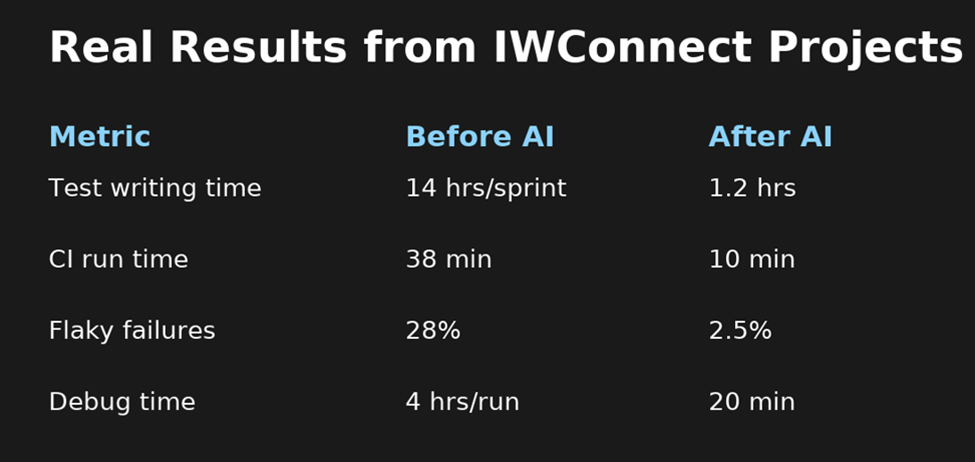
Result: 73% faster CI runs, fewer wasted builds.
Conclusion – From Automation to Intelligence
| AI Layer | What It Does | Why It Matters |
| Generate | Creates TestRail test cases automatically | Saves hours, increases consistency |
| Prioritize | Runs only risky tests | Speeds up feedback loops |
The future of testing isn’t about executing more tests – it’s about executing the right tests at the right time.
At ⋮IWConnect, we aren’t just automating test execution.
We’re enhancing intelligence within the testing process powered by AI, centered on TestRail, and built to deliver smarter quality.
Step 3: The Full ⋮IWConnect AI Pipeline
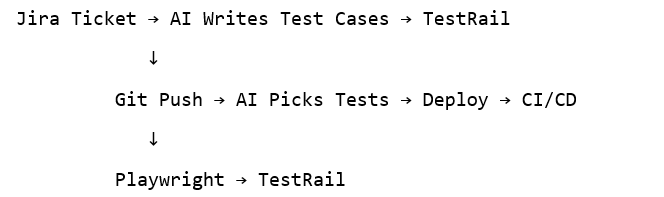
Every layer adds intelligence — but humans stay in control.
TestRail remains the single source of truth, uniting automation, AI, and analytics.
Coming Next
Part 2 — Self-Healing Tests & AI Root Cause (Powered by TestRail)
In Part 2, we’ll show how TestRail evolves from a test manager to a smart QA hub that connects automation, AI, and defect management:
- Playwright test fails → AI analyzes failure trace → suggests a new locator.
- GPT summarizes logs, stack traces, and screenshots → adds insights to the TestRail test run comment.
- A Jira bug is created automatically → linked in the Defect field of the related TestRail case for full visibility.
- TestRail dashboards update dynamically with defect distribution and recurring failure insights.
TestRail becomes the bridge between AI-driven analysis and human decision-making.